

There are more free plugins for music production than you might think and just because they're free plugins doesn't mean they can't be used in professional sounding mixes. In this post, we're going to be sharing with you 11 of our favorite free VST, AU & AAX plugins.
These plugins are all free legal plugins and they're not demos or trials. You'll find the download links for all the plugins included in the descriptions of each plugin.
Whether you're producing or mixing music hopefully there will be a plugin here for everyone. You'll have to test some of these plugins for yourself and find a way to fit them into your tracks when you’re mixing and mastering.
Top 11 Free Audio Plugins
11 Best Free Plugins - VST, AU & AAX
1. Flux - BitterSweet v.3 - Free Transient Designer Plugin
This plugin is a transient shaper. Not only does it look great it performs great as well. You might be wondering what a transient is, it's basically just a sharp change in the audio signal level. This could be at the start of a note or a sample.

In the demo video above the plugin is being used on an acoustic guitar. You can hear a lot of plectrum noise and those are very transient sounds. So this plugin can be used to either squash those down and really make the performance smooth or you could take it in the other direction and make it a really aggressive sounding.
I like Bittersweet because you have the option to change the sort of time period that the transients are being affected it also auto compensates the gain and overall it's just really easy and simple to use.
Mac OS X: VST 64-bit | AAX 64-bit | AU 64-bit
Windows: VST 64-bit | AAX 64-bit
BitterSweet download link: https://fluxhome.com/project/bittersweet/
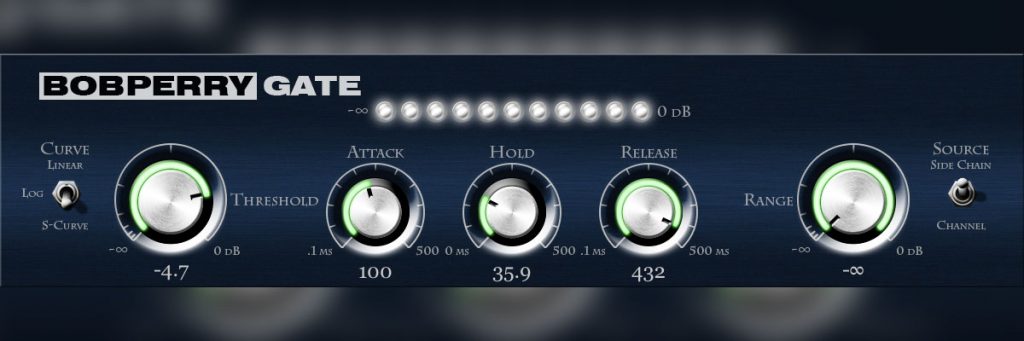
2. Bob Perry Audio - Bob Perry Gate - Free Noise Gate Plugin
This is an excellent plugin to help reduce unwanted noise on your recordings, whether it be drums, vocals or guitars. You have the option for sidechaining and the choice between three distinct, smooth-sounding algorithms.
Most DAWs come with a noise gate included, however, the free Bob Perry Gate adds a few extra features to provide more control in the gating process. The plugin includes three different signal detection algorithms linear, logarithmic and S-curve these algorithms make it possible for the gate to respond to different types of audio signals with higher precision (and less audible gating artifacts).
In the video above you'll hear a demo of the plugin and how it sounds on a snare drum.
Mac OS X: VST 32/64-bit | AU 32/64-bit
Windows: VST 32/64-bit
Bob Perry Gate download link: https://www.bobperry-audio.com/shop/bob-perry-gate/
For more information about noise gates and how to use them check out this other article we wrote: https://homestudiorecordings.com/noise-gate/
3. Cableguys - Pancake 2 - Free Flexible Panning Modulation Plugin
This plugin is called pancake and it's such a time-saver. What it is is a Panning Modulation Plugin. You can use it to create automated panning curves and you can choose the duration time for the panning effect. It will automatically pan the audio input signal from left to right or you can manually draw some crazy panning curves.

It saves you a lot of time with automation you don't have to use the playlist and automate panning or anything like that you can just set this and let it go. Another really useful feature with this plugin is the mix dial because you can blend it so that you have just the pan signal or you can keep some of the centered audio signal. You can also use it for some subtle panning to make some really spacial sounds.
In the video sample above you should be able to hear the effect of the gentle panning from left to right and then more extreme panning as well. You can also hear some presets and hear the really crazy panning modes.
Mac OS X: VST 32/64-bit | AU 32/64-bit
Windows: VST 32/64-bit
Pancake 2 download link: http://www.cableguys.com/pancake.html
4. Audio Assault - HeadCrusher - Free Analog Saturation Plugin
This is a very cool saturation/distortion plugin that can add some awesome tones. It can be used to add subtle weight to a signal or full-on harmonic destruction.

What we particularly like about this plugin is its tone dial that lets you choose whether the saturation is on the high frequencies or on the low frequencies which is very handy. There is also an output gain dial, which makes it really simple to set the amount of output you want so you can do a fair comparison. It also has an inbuilt high cut and low cut so that you can really shape the saturation to your taste.
In the video sample above you can hear what the plugin sounds like on bass guitar with some overdrive and making it sound really gritty and distorted. It might not be something you're looking for but it hopefully will give you an idea of how versatile this plugin can be.
Mac OS X: VST 32/64-bit | RTAS 32/64-bit | AU 32/64-bit
Windows: VST 32/64-bit
Headcrusher download link: http://www.vst4free.com/free_vst.php?plugin=HeadCrusher_Free&id=2112
5. Voxengo - SPAN - Free spectrum analyzer plugin
This plugin is a Spectrum Analyzer and can be a lifesaver if you're mixing on headphones, using smaller speakers or don't have a well acoustically treated room.
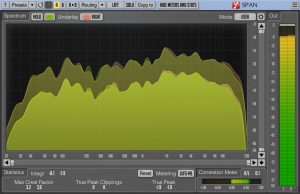
I find this plugin particularly useful for finding the prominent frequencies of a kick drum or bass guitar and see how you can get them to work around each other frequency wise.
I often use this plugin for checking my EQ settings. For example, if I've reduced the low frequencies in an EQ plugin to what I think is a good amount. I then check it on SPAN and sometimes I find there is still a lot of low-frequency information there. This is especially the case if I'm using small speakers or headphones that can't reproduce those low frequencies. This plugin helps me find those frequencies that are muddying and using up Headroom in my mix.
In the video demo above you can see how we can use SPAN to analyze the frequencies of two instruments at the same. This can be really useful to find out where frequencies are clashing between instruments.
Mac OS X: VST 32/64-bit | AAX 32/64-bit | AU 32/64-bit
Windows: VST 32/64-bit | AAX 32/64-bit
SPAN download link: http://www.voxengo.com/product/span/
These next three free plugins all come from one company called TDR and I've been using them in almost every mix I do.
The first plug-in is...
6. TDR NOVA - Free dynamic EQ plugin
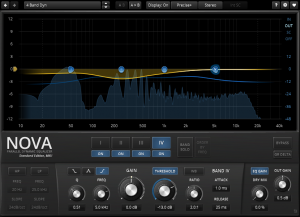
Nova is an EQ and multiband compressor. It has all the standard EQ features you might expect from an EQ, very accurate shelving and cutting, it has a high-pass filter and a low-pass filter and these can be quite a gentle slope or they can have very steep slope precision. Nova gives you the ability to really sculpt the sound the way you want, but where this gets interesting is its ability to act as a multiband compressor. You can select certain frequencies and compress them individually.
I think this plug-in is great for a beginner because most multiband compressors can look really complex and Daunting, even if they're not. Nova however just looks simple, the layout is very intuitive and easy to use and it's very easy to compress certain regions very transparently.
Mac OS X: VST 32/64-bit | AAX 32/64-bit | AU 32/64-bit
Windows: VST 32/64-bit | AAX 32-bit
TDR NOVA download link: http://www.tokyodawn.net/tdr-nova/
7. TDR Kotelnikov - Free mastering compressor plugin
The second plugin from TDR is called kotelnikov it's a mastering compressor, it's digital and seriously quick. It sounds clean and it's just a really good compressor, especially if you're learning the basics of compression and you want to avoid distortion. It's not modeled on analog gear, it's just designed to be as precise and transparent as possible.
Mac OS X: VST 32/64-bit | AAX 32/64-bit | AU 32/64-bit
Windows: VST 32/64-bit | AAX 32-bit
TDR Kotelnikov download link: http://www.tokyodawn.net/tdr-kotelnikov/
For more information about compressors and how to use them check out this other article we wrote: https://homestudiorecordings.com/what-does-an-audio-compressor-do/
8. TDR VOS SlickEQ - Free EQ plugin
The third plugin from TDR is called VOS SlickEQ. It's a really simple EQ plugin with a little bit of analog modeling and subtle saturation curves. But it's usually really clean and it's just a nice-sounding EQ to add to your arsenal of VSTs.
Mac OS X: VST 32/64-bit | AAX 32/64-bit | AU 32/64-bit
Windows: VST 32/64-bit | AAX 32-bit
TDR VOS SlickEQ download link: https://www.tokyodawn.net/tdr-vos-slickeq/
9. TAL - Reverb-II - Free reverb plugin
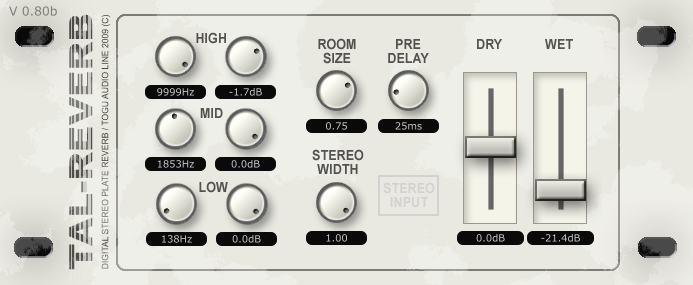
This is a reverb plugin, it has all the dials and controls you'd expect a reverb to have wet/dry mix, pre-delay, room size, but it also has a really precise inbuilt filter which can really help you shape your reverb. Also it's simple it's a good place to start everyone needs reverb for something
In the video above you can hear some samples of the reverb in use and what the plate reverb sounds like on different instruments.
Mac OS X: VST 32-bit | AU 32/64-bit
Windows: VST 32/64-bit
TAL Reverb-II download link: https://tal-software.com/products/tal-reverb
10. Soft Tube - Saturation knob - Free Saturation plugin
This saturation plugin sounds great, it can give drums extra grit, Fatten up your bass, give guitars extra body, or warm-up vocals. It can even sound great on the master bus. This simple Saturation Knob plugin models output distortion to give you control over the tone and drive of your tracks.
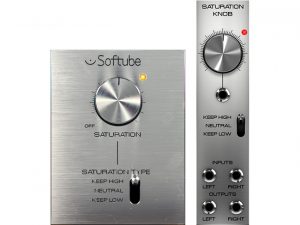
The only downside of this plugin is that it also increases the gain and increases the amount of saturation. What I do to get around this is use gain/trim plugins before and after the Saturation Knob. Both gain units are linked and this gives me an even input and output level from the plugin.
In the demo video above you'll hear some examples of what the plugin sounds like on different instruments and get some ideas of where you might want to use it in your mix. Saturation can be a really good way to draw people's ears to certain elements of a mix for just a few seconds then you can pull the saturation off again.
Mac OS X & Windows: 64-bit VST, VST3, AU, or AAX (11.0.2 or higher).
Saturation knob download link: https://www.softube.com/saturationknob/
11. Vladg - Limiter №6 - Free mastering limiter plugin
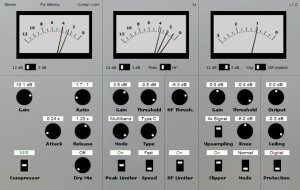
The last plugin on this list is a mastering limiter called Limiter №6 by Vladg. This limiter gives me the ability to add a great amount of gain. When applying like 3dB to 6dB of limiting it still sounds really transparent. It seems to smooth out the peaks nicely and it doesn't really throw off the frequency balance of your mix.
So I just thought I'd include this because it seems to be an incredibly transparent limiter that I think is really easy to use even as a beginner.
Mac OS X: VST 32/64-bit | AU 32/64-bit
Windows: VST 32/64-bit
Limiter No.6 download link: https://vladgsound.wordpress.com/plugins/limiter6/
Conclusion
Free plugins can give you a lot of new creative ideas for your mixes. Just about all the free music recording software DAWs support using VST plugins. So I hope this plugin list will help you find some new inspiration for your mixing and mastering.


