Have you been putting off making music because you assume you need to drop hundreds of dollars on studio software first? You don't. Instead of just re-listing spec sheets, I spent time in the trenches — reading through Gearspace, r/WeAreTheMusicMakers, and r/audioengineering — to find out how the best free music recording software DAW options actually hold up once real producers start pushing on them, past the marketing screenshots. This is my meta-analysis of what people who actually use each tool say about it, folded into a straightforward Mac, Windows, and Linux buying guide for 2026.
A lot changed in the free-DAW world recently, and a good chunk of the "best free DAW" roundups you'll find with a quick search are already out of date. Cakewalk by BandLab was fully sunsetted on June 30, 2026, and replaced by two new free products — Cakewalk Sonar and Cakewalk Next — each with its own free tier. Avid's old free giveaway, Pro Tools First, has been gone for a while too, and its successor, Pro Tools Intro, works differently enough that it deserves a fresh look. We've rebuilt this guide from the ground up to reflect what's actually current, rather than what was true two or three years ago.
Key Takeaways
- GarageBand is still the easiest on-ramp for Mac users, with zero learning curve and a huge built-in sound library.
- Cakewalk by BandLab is gone. Windows users now want Cakewalk Sonar's Free Tier, which keeps the full mixing console and unlimited tracks.
- Pro Tools First is also gone. Its replacement, Pro Tools Intro, is free but caps you at 8 audio, 8 instrument, and 8 MIDI tracks.
- Waveform Free and Studio One Prime both offer genuinely unlimited tracks with no time limit or nag screens.
- Most free DAWs support VST or AU plugins now — Studio One Prime is the notable exception, which locks you to its built-in tools only.
The Quick Summary (TL;DR)
- Best for Mac Beginners: GarageBand
- Best for Windows: Cakewalk Sonar (Free Tier)
- Best for Unlimited Tracks: Waveform Free
- Best for Future Studio Pros: Pro Tools Intro
- Best for Audio Editing (Not Music): Audacity
The Core Data: At-a-Glance Comparison
Before the deep dive, here's how the five most-recommended free DAWs stack up purely on the numbers.
| DAW | OS | Track Limit | VST/Plugin Support | Biggest Limitation |
|---|---|---|---|---|
| GarageBand | macOS, iOS | 255 tracks | AU only, no VST | No real mixing console |
| Cakewalk Sonar (Free) | Windows | Unlimited | Yes (VST2/VST3) | Sample library & FX suite gated behind Membership |
| Waveform Free | Mac, Win, Linux | Unlimited | Yes (VST/VST3) | Single-screen layout breaks standard tutorials |
| Pro Tools Intro | Mac, Windows | 8 audio / 8 MIDI | AAX only | Hard 8-track ceiling |
| Audacity | Mac, Win, Linux | Unlimited | Yes (VST3, LV2, LADSPA) | No MIDI support |
Note: cells are kept short on purpose so this table stays readable on mobile. Full context, including plugin quirks and the actual community consensus on each, is below.
What Makes the Best Free DAWs Stand Out in 2026?
Before ranking anything, it's worth understanding what separates a genuinely useful free DAW from a bait-and-switch trial. The best free music recording software DAW options we tested all share a few things in common:
- An interface you can learn without a tutorial marathon
- Real audio and MIDI recording, not just loop arranging
- Built-in effects and instruments so you can start writing immediately
- A path to third-party plugins for when you outgrow the stock sounds
- An active user base, so you're not troubleshooting alone
Your DAW choice matters just as much as the rest of your setup. If you haven't sorted out the hardware side yet, our guides to USB microphones for vocals, choosing an audio interface, and studio monitors cover the rest of the signal chain.
The Deep Dive: Community Consensus on the Top 5
These are the five DAWs that come up again and again in production forums, broken down by what the community actually praises, what it complains about, and who should steer clear.
1. GarageBand (macOS / iOS)

Platform: macOS, iOS, iPadOS
Track Limit: 255 tracks
Best For: Beginners and songwriters
The forum praise: Mac users consistently agree GarageBand is the most frictionless way to start. There's genuinely zero learning curve, the built-in Drummer track is good enough to build a whole demo around, and the massive stock loop and instrument library means you can go from empty project to finished idea in one sitting.
The common gripes: As soon as people try to route audio between tracks or build a serious mixing chain, GarageBand's limitations show. There's no real console view, no third-party VST support (Audio Units only), and busing/sidechaining are far more limited than in a proper DAW.
Who should avoid it: PC users, obviously — but also anyone who wants to learn a traditional mixing workflow they can carry into a paid DAW later. For that, see our free GarageBand alternatives for Windows, and our full how to use GarageBand on Mac walkthrough if you're just getting started.
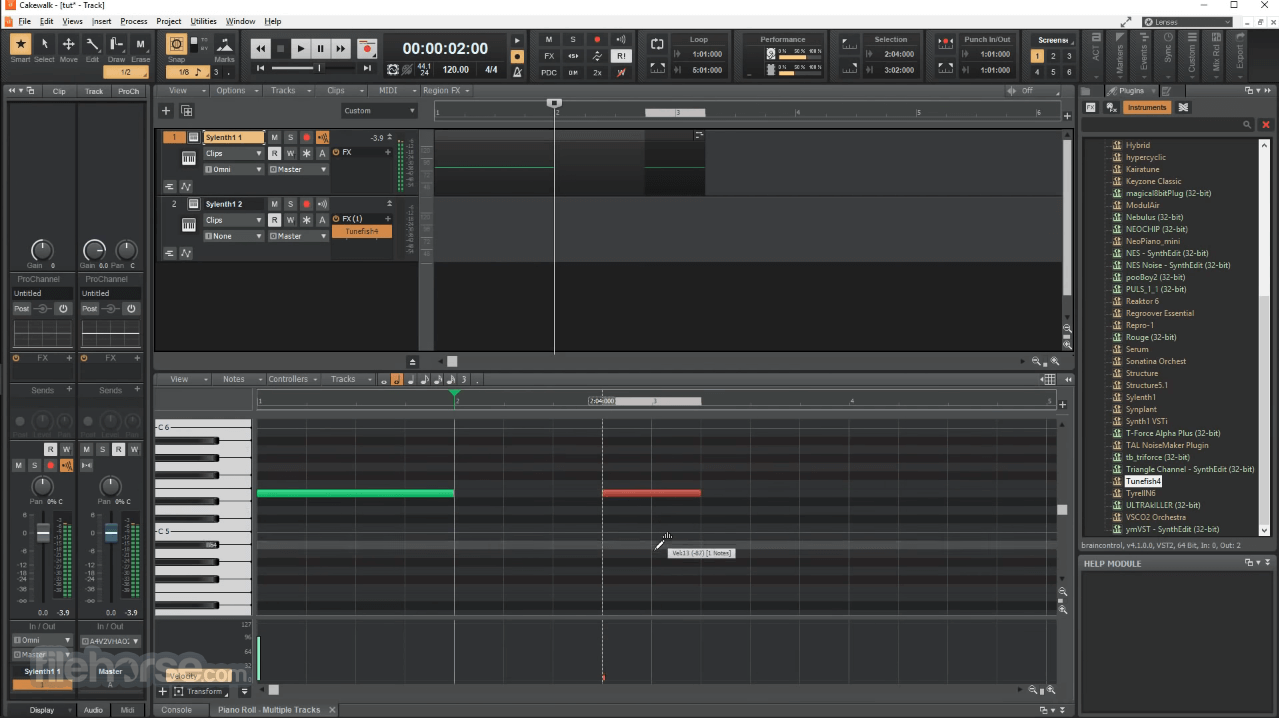
2. Cakewalk Sonar — Free Tier (Windows)
Platform: Windows 11 (64-bit)
Track Limit: Unlimited
Best For: Windows users who want a full mixing console for free
The 2026 update note: Cakewalk by BandLab was retired for good on June 30, 2026, and no longer activates. It's been replaced by two products: Cakewalk Sonar, a rebuilt, high-DPI version of the classic workflow, and Cakewalk Next, a newer cross-platform app. Both now ship with a genuine free tier — you don't need a BandLab Membership to use them, and the free tier is described as perpetual, not a timed trial.
The forum praise: The community consensus hasn't changed — Sonar's Free Tier still offers the most complete free mixing console on PC, with unlimited tracks, take lanes, comping, and the ProChannel strip on every track.
The common gripes: The free tier holds back a handful of things: you get one Arranger Track instead of unlimited, a trimmed-down ProChannel module set, the Overloud TH-U amp sim runs in demo mode, and BandLab Sounds' 100,000+ loop library is only partially accessible. None of that blocks a real mix — it's mostly upsell nudging.
Who should avoid it: Mac users (Sonar is Windows-only — Cakewalk Next is the one to try if you're cross-platform), and absolute beginners who might find the dense, old-school layout overwhelming on day one. Pair it with a solid audio interface to get the most out of the mixing console.
3. Waveform Free by Tracktion (Mac / PC / Linux)

Platform: macOS, Windows, Linux
Track Limit: Unlimited
Best For: Anyone who wants a modern, single-screen workflow
The forum praise: Waveform Free is genuinely beloved for having zero track limits and full VST plugin support, with no paywall or nag screen — an increasingly rare combination among free DAWs.
The common gripes: The single-screen workflow is polarizing. Everything lives in one window rather than the usual separate edit/mix/piano-roll windows, which some engineers find fast and others find genuinely disorienting when switching from another DAW. Check out the full library of options in our best free VST plugins roundup to start expanding it.
Who should avoid it: People who want to follow along with standard YouTube tutorials — since Waveform's layout doesn't match any other major DAW, most beginner tutorials won't translate directly.
4. Pro Tools Intro (Mac / PC)

Platform: macOS, Windows
Track Limit: 8 audio, 8 instrument, 8 MIDI tracks
Best For: Aspiring professional producers
Worth being precise here: Pro Tools First is dead — Avid discontinued it and replaced it with Pro Tools Intro. They're not the same software. First allowed up to 16 audio and 16 instrument tracks; Intro drops that to 8 of each, plus 8 MIDI tracks, 4 aux tracks, and a single master fader. In exchange, Intro ships with 36 stock plugins and instruments (versus First's much thinner offering) and requires a free iLok account to activate.
The forum praise: It's the exact same audio engine and editing shortcuts as the paid, industry-standard version. Anyone learning Pro Tools Intro is learning real, transferable Pro Tools skills, and Avid has continued adding features like Pro Tools Sketch's clip-based workflow even to the free tier.
The common gripes: The hard 8-track ceiling makes mixing a full band genuinely difficult, and there's no video track support. Producers commonly work around the limit by bouncing groups of tracks down to stems, the same way engineers used to work around 4- and 8-track tape decks.
Who should avoid it: Beatmakers, or anyone who wants to produce a full song without hitting a wall. Treat it as a learning workflow rather than a finished-song tool — our how to record a song at home guide uses Pro Tools screenshots throughout if you want a head start.
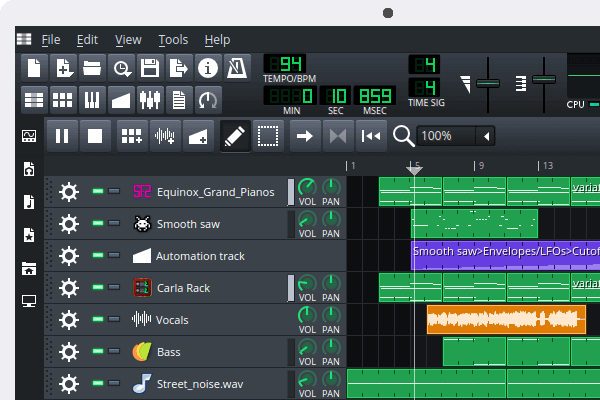
5. LMMS (Mac / PC / Linux)
Platform: macOS, Windows, Linux, Android
Track Limit: Unlimited MIDI tracks
Best For: Electronic beatmakers and MIDI-heavy composers
The forum praise: LMMS is widely recommended as the best free alternative to FL Studio for electronic producers, thanks to its step sequencer, piano roll, and built-in synths like ZynAddSubFX. A MIDI controller keyboard makes the workflow click a lot faster — here's how to connect a MIDI keyboard to your computer if you're setting one up for the first time.
The common gripes: Live audio recording is genuinely weak — LMMS was built around programmed music, not tracking vocals or instruments through a mic.
Who should avoid it: Anyone planning to record live guitars or vocals as the core of their workflow. LMMS is a beatmaking and MIDI tool first.
Rapid-Fire: DAWs 6 Through 10
Rounding out the top 10 without the word bloat — these five are all worth trying depending on your workflow.
6. Studio One Prime (Mac / PC)
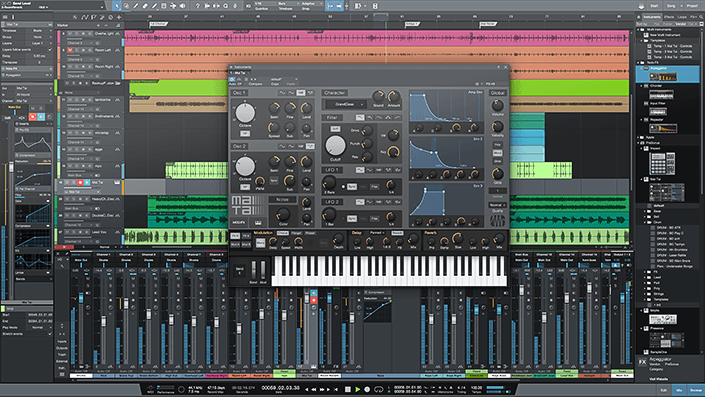
PreSonus's free tier gives you unlimited tracks, unlimited automation lanes, and the same drag-and-drop workflow as the paid versions — with no track limits or time-outs. The catch: zero third-party VST or AU plugin support. You're limited to Studio One's own built-in effects and the Presence sampler. It's an excellent, uncluttered first DAW, but you'll outgrow it the moment you want a specific third-party synth or plugin chain.
7. Audacity (Mac / PC / Linux)
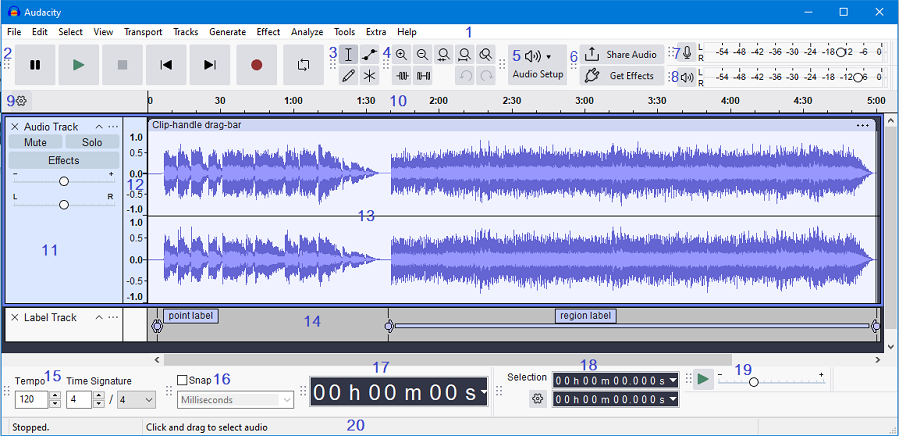
Audacity has been the default free audio editor since 2000, and it's still evolving — recent versions added real-time, non-destructive effects with VST3, LV2, and LADSPA plugin support, a genuine step up from the purely destructive editing it was known for. It still has no MIDI support and isn't a true multitrack DAW, but for podcast editing, dialogue cleanup, or general audio restoration, it remains hard to beat. If you're recording spoken word, our dynamic microphones guide pairs well here.
8. MPC Beats by Akai (Mac / PC)
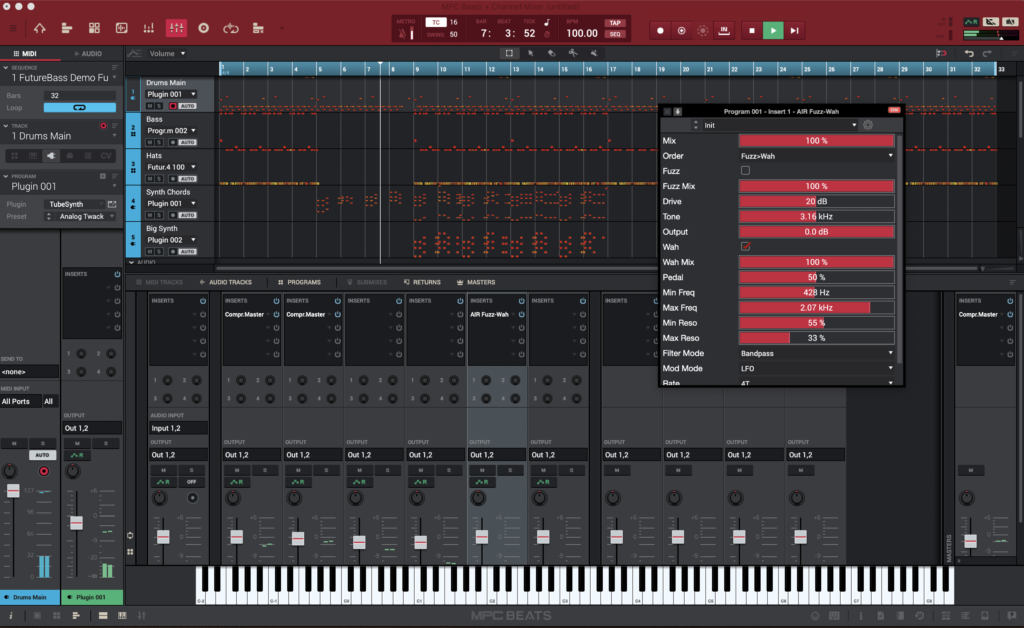
MPC Beats brings Akai's legendary 16-pad workflow to your computer for free, with a 2GB sound library, VST/AU plugin support, and auto-mapping for popular MIDI controllers. The trade-off is that only 2 stereo audio tracks can record simultaneously, alongside 8 MIDI/instrument tracks — it's built for sample-based beatmaking, not live band tracking.
9. Ardour (Mac / PC / Linux)

Ardour is the open-source choice: full source code access, no licensing restrictions, unlimited tracks, and professional-grade routing. It's popular in the Linux audio community specifically because most alternatives here are Windows- or Mac-first. The trade-off is a genuinely steeper install and setup process than any DAW above it on this list.
10. Bundled Picks: Cubase LE & Ableton Live Lite

These two don't get downloaded directly — they come bundled with hardware. Buy a compatible MIDI interface or audio interface and you'll often get Cubase LE (16 audio, 24 MIDI, 8 instrument tracks) or Ableton Live Lite (8 tracks, 8 scenes) thrown in at no extra cost. If you're buying an interface anyway, checking which bundled DAW it ships with is free value you shouldn't skip.
System Bottlenecks: Will Your PC Actually Run These?
Here's the part most "best free DAW" lists skip: the DAW itself costs nothing, but your CPU, RAM, and storage still bill you the moment you stack more than a handful of tracks or plugins. Cakewalk Sonar's own suggested specs, for example, now call for 16 GB of RAM and an 8-core CPU for a comfortable experience — a big jump from what these DAWs needed a few years ago. An aging laptop that struggled with 8 tracks of audio and a couple of virtual instruments will struggle just as much whether the DAW cost $0 or $600.
Before you download a DAW and start stacking plugins, it's worth checking your machine against real-world requirements rather than the bare minimum listed on a download page. Our guides to music production computer specs and choosing a computer for music production break down exactly what CPU, RAM, and storage you need at different budget levels, so you're not troubleshooting crackles and dropouts on session one.
Find Your Free DAW
Filter all 10 by your operating system and experience level to shortlist your options in a few seconds.
Find Your Free DAW
10 tools, filtered by platform and experience level
Platform
Experience Level
No DAWs match that combination — try broadening a filter.
Choosing the Best Free DAW for Your Needs
Consider Your Operating System
Mac users: GarageBand offers the most polished experience with zero learning curve. Windows users: Cakewalk Sonar's Free Tier gives you the most complete mixing console at no cost. Linux users: LMMS and Ardour offer the best native support. Cross-platform needs: Waveform Free or Studio One Prime run identically everywhere.
Match Your Music Style
Singer-songwriters: GarageBand or Waveform Free. Electronic producers: LMMS or MPC Beats. Podcast creators: Audacity handles spoken word with excellent editing tools. Professional aspirants: Pro Tools Intro or Cakewalk Sonar teach industry-standard workflows you'll actually use later.
Assess Your Technical Comfort Level
Beginners: GarageBand (Mac) or Studio One Prime (PC) for the gentlest learning curve. Intermediate users: Cakewalk Sonar or Pro Tools Intro add professional features without overwhelming complexity. Advanced users: Ardour offers maximum customization for those willing to put in the setup time. Once you outgrow the stock sounds, our best free VST plugins guide is the natural next stop, alongside a proper home recording studio equipment list.
Our Methodology
This isn't a repackaged spec sheet. Here's how we built it:
- We read through active 2026 threads on Gearspace, r/WeAreTheMusicMakers, and r/audioengineering rather than relying on old reviews.
- We cross-checked every track limit, plugin format, and free-tier restriction against each manufacturer's own current documentation.
- We discarded sponsored manufacturer claims in favor of what actual users report hitting in practice.
- We specifically checked for 2025–2026 software changes — like the Cakewalk by BandLab shutdown — that make older "best free DAW" articles inaccurate.
What is a DAW?
DAW is short for Digital Audio Workstation and is the software used to record, edit and mix your recordings on your computer.
What happened to Cakewalk by BandLab?
Cakewalk by BandLab was fully retired on June 30, 2026, and no longer activates. It has been replaced by two free products: Cakewalk Sonar (Windows-only, the direct successor) and Cakewalk Next (cross-platform). Both can open old Cakewalk by BandLab project files.
Is Pro Tools First still available?
No — Pro Tools First has been discontinued and replaced by Pro Tools Intro. Intro reduces the track count from 16 to 8 audio/instrument tracks, but adds far more stock plugins and stays closer to the paid Pro Tools workflow.
Summary of the Best Free DAWs
There's genuinely no shortage of good free DAW software in 2026, so there's no excuse not to be making music. If I had to pick one completely free, full-version DAW for each platform:
Best Free DAW for Mac — GarageBand
Best Free DAW for Windows — Cakewalk Sonar (Free Tier)
Best Free Option for Simple Audio Editing — Audacity
Conclusion: Your Free DAW Journey Starts Now
Music production has never been more accessible, and the best free music recording software DAW options in 2026 offer genuinely professional tools without spending a dollar on software. Whether you land on GarageBand for its simplicity, Cakewalk Sonar for its full mixing console, Pro Tools Intro for an industry-standard workflow, or anything else on this list, the most important factor is starting.
Your next steps:
- Download your chosen DAW and spend time exploring the interface before recording anything
- Check your system specs against our computer specs guide so you're not fighting crackles on session one
- Start with a simple project — even recording yourself humming a melody
- Set up your room properly using our how to build a home studio guide
- Practice consistently — even 15 minutes a day builds skills quickly
Countless hit songs have been made on free software. Your limitations aren't technological anymore — they're only as big as your imagination. Plug in your microphone, and let's make some music.
Ready for more headroom? Check out our Best DAW Software guide for the paid options worth upgrading to.