

It's important to choose the best computer for music production because it can make or break your music. If you're a producer or a musician, then you probably want to invest in the best computer for music production money can buy. So what should you look out for when shopping around?
First and foremost, it has to be powerful enough to handle all of your audio editing tasks. You don't want anything slowing down your workflow by running slow on older hardware as some laptops do. A desktop PC is going to give you more power than a laptop, so that's one thing we recommend looking into first.
Second, it needs to have plenty of RAM and hard drive space (so you can save on projects). Most manufacturers offer faster models with more RAM and bigger hard drives nowadays, but if that isn't an option then at least try not to go too small as this will definitely limit how many projects you can store on your computer without having performance issues later on.
For more information on computer specs check out our guide: Specs for Music Production Computer
Our Top Picks


Best Music Production Computers 2026
Below I have listed our top 10 computers for music production, we've tried to include pros and cons of each of them to help you make an informed decision:
1. Dell XPS 8940
The Dell XPS 8940 is a great computer to buy for music production because it sits right in the middle of everything you need from one, including affordability.
This computer has decent specifications and is built for efficient cooling. More importantly, it has a modular design that leaves it open to upgrade when any given part starts outliving its usefulness.
If you are an aesthete, you may find the outward design of the Dell XPS 8940 a bit outdated, but it will nonetheless do everything you need it to do for many years into the future.
Pros
- Upgradeable
- Up to 32GB of DDR4 RAM
- Good power for music production
Cons
- Not the most attractive design
2. Apple iMac M1

The Apple iMac M1 is a remarkable design that is only possible thanks to the M1 system on a chip. The M1 chip integrates the processor, graphics, memory and more onto a single chip, which allows for an entire computer to be put into such a small space. The result is exceptional levels of performance, efficiency and security.
The iMac wakes from sleep almost instantly, apps launch quickly and the whole system feels smooth and speedy. With up to 85% faster CPU performance and up to 2x faster graphics performance than standard 21.5” iMac models, the iMac can handle intense workloads with ease. What’s more, it stays cool and quiet even while tackling these tasks.
Overall, the Apple iMac is an impressive device that anyone would be lucky to own. Its design, performance and features are top-notch and sure to impress. I highly recommend this computer for anyone in the market for a new desktop!
Pros
- Attractive Design
- Fast response times
- Powerful
Cons
- Not upgradeable after purchase
3. Apple Mac Pro
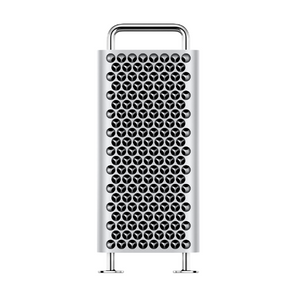
The new Apple Mac Pro is an excellent piece of technology, but some have referred to it as the ‘cheese grater’ due to its resemblance. Regardless, the potential specs are amazing.
Central to the Mac Pro is an Intel Xeon processor with capabilities of up to 28 cores. this is more than any other Mac has had. Furthermore, sizable L2 and shared L3 caches as well as 64 PCI Express lanes facilitate high levels of bandwidth both into and out of the processor.
However one of the major downsides with the Mac Pro is the price if you go to the Apple website and max out the specs, you will see that the final cost is over $60,000. That's EXPENSIVE for a computer, but this one would hopefully last you many years.
Pros
- Up to 28 Core
- Up to 8TB SSD
- Best performing Mac ever
- Is upgradeable
Cons
- Expensive
4. HP Pavilion 690

If you like the idea of compromise but are on a bit of a budget, the HP Pavilion 690 is the perfect solution. This computer is a few years old which puts it behind in terms of specifications, but for the price you pay, you actually get quite a lot of power.
Be careful when buying this computer, however. If you plan on gradually upgrading it part by part, you will not be able to do so easily with the HP Pavilion 690. Because of its age, a lot of its interfaces are no longer current.
For example, this computer uses the outdated DDR4 interface for RAM. If you want to upgrade your RAM, you will have to buy outdated DDR4 chips. If you want to upgrade to DDR5 RAM, you will also have to replace the motherboard. Replacing a motherboard often means replacing many other parts, which makes it effectively a full computer replacement rather than an upgrade.
Pros
- Upgradeable
- Runs fast
- Good price considering the specs
Cons
- The power supply has high energy consumption when external devices are connected.
5. Skytech Legacy 2070

The Skytech Legacy 2070 is a computer that was built with speed and power in mind. It has a water-cooling mechanism that helps to keep it running fast and cool, and it also has a very powerful NVIDIA graphics card. The 16GB of RAM and 500GB of SSD storage space are also impressive, and the computer comes with a number of pre-installed programs that will be useful for anyone who wants to use it for gaming or other purposes.
The downside of the Skytech Legacy 2070 is that it is not a dedicated computer for musicians. A lot of the graphics capability will go to waste if it is only going to be used for audio production, but for anyone who needs a fast and powerful computer, it is definitely worth considering.
Pros
- Fan noise is reduced with water cooling
- Ready to use
- Powerful
Cons
- The graphics card is a bit overkill for just music production use
6. Apple Mac Mini M1

The new Mac Mini M1 is a powerful little machine. It's got a lot of the same features as the last four versions of the Mini, but it's been updated with some impressive new specs. The Apple Mac Mini M1 may seem like a controversial choice due to its small size and low price point, but the fifth generation really holds its own.
These new Mac Minis use Apple’s own new chips, and with 3.2 GHz octa-core processors and up to 16 GB of RAM, they measure up to many desktop competitors. It's also three times faster than the previous generation Mini.
Pros
- Smallest in the M1 lineup
- Good Value
- Powerful
Cons
- Limited connectivity
- Looks the same as the previous models
7. Microsoft Surface Studio 2

Microsoft’s Surface Studio 2 is a computer that will give you a lot of power for all sorts of tasks, including music production and everything beyond. It even comes with a touch screen for a more ergonomic experience.
The Microsoft Surface Studio 2 is equipped with an Intel Core i7 processor and 16 GB of RAM, making it a powerful machine that can handle even the most demanding music production tasks.
The catch is that the price point of the Surface Studio 2 is one of the highest around. If you have the budget for it, it is a good all-round computer to have, but if you are serious about music production, that budget may be better spent on a computer that is specialized for that task.
Pros
- Generous 2 TB of SSD storage
- Convenient touch screen
Cons
- Expensive
- Not a dedicated music production computer
8. Apple MacBook Pro

Although laptops are rarely the first choice for music production, if you do want a laptop for music production, the Apple MacBook Pro is a good choice. It has a powerful processor and huge amount of RAM allow you to run multiple audio production software programs simultaneously without any lag or stuttering.
As of 2020, these computers use Apple’s new M1 chips, which has given them a significant boost in performance over their predecessors. Just make sure to get the 16 GB RAM upgrade on purchase rather than the 8 GB base model.
Plus, the built-in Retina display is perfect for editing audio files and composing new music. If you're a "Mac person," there's really no better option when it comes to laptops for music production.
Pros
- Powerful processor
- Huge amount of RAM
- Retina display
Cons
- Pricey
9. Alienware Aurora R10

The Alienware Aurora R10 is a uniquely designed desktop that comes with highly powerful 16GB RAM and 1TB SSD. It also includes an NVIDIA Graphics card. Some people may not find the design catchy, but it definitely looks unique. The esthetic design innovation creates an overall powerful look.
It is a gaming computer but it's suitable for music production. The octa-core AMD Ryzen 7 5800X processor it comes with has a base clock rate of 3.8 GHz but can boost all the way up to 4.7 GHz.
The best thing about the Aurora R10 is that in spite of its great specifications, it is priced quite reasonably. A part of the reason for this is that some of the standards, like the DDR4 RAM interface, are outdated, which makes it more expensive to upgrade.
Pros
- Unique design
- Great Specs
- Upgradeable
Cons
• Some people may not like the design
FAQs About Music Production Computers
What makes a good Computer for music production?
Whether you are choosing from one of the computers in the list above or whether you are seeking one out on your own, you may feel overwhelmed by all the different options and combinations. In order to sift through these, you need to understand which pieces of hardware are the most important.
The main specifications you should be looking out for are:
The speed and number of cores of the CPU
The speed and size of the RAM
The type and size of permanent storage
Additionally, if you use specialized hardware to record or input music, you will need to make sure that the computer you are buying can interface with them.
What CPU do I need in a music production computer?
When you are considering CPU, you will need to look at not only the clock speed but also the number of cores it contains. The best case scenario is to have a CPU with as high a speed as possible and as many cores as possible. These tend to become expensive, so let’s look at some compromises.
Bottoming out of the budget range of CPUs suitable to sit within the best computers for music production is Intel’s Core i3-10100. This is a quad-core processor with a base clock speed of 3.6 GHz. You should not aim for either the number of cores or the clock speed to be below these specifications for your music production computer.
An alternative from AMD would be the Ryzen 5 3600. Its clock speed is 3.6 GHz as well, but it has six cores instead of the 4 of the i3-10100.
How much RAM do I need for Music Production Computer?
The more RAM you have, the better. Unlike with CPUs, you will reach a point of diminishing returns as you increase your RAM, so let’s look at where the sweet spot is.
The best computers for music production will have either 32 GB or 64 GB of RAM. This covers the regular operations of your computer’s operating system, the music production software and potential hardware interfaces, and the audio that you are processing at any given moment.
You can treat 16 GB as a minimum for music production work, but if you do this, you should expect potential slowdowns with more resource-intensive tasks.
Remember that RAM is not all about the size of the memory. RAM chips have their own clock rates and standards. As with CPUs, the higher the clock rate, the better. Do not worry too much about this, however, since if you get a chip in the current standard, it will have a suitable clock rate for music production. The current standard is DDR5.
What type of storage do I need for a music production computer?
At least 1TB of storage is recommended. Internal storage should be at least 500GB and external storage at least 500GB. If you're using sample-based plugins, you'll need a lot more storage space though, especially if you have a large number of samples. Solid-state drives are also a good choice, as they offer faster read and write speeds.
Is a desktop better than a laptop for music production?
While laptops can be used for music production, they are generally not as powerful as desktop computers. Desktops have more processing power and RAM, which is essential for running intense music production software.
If you're serious about music production, a desktop is the best option. But if you're on a budget, a laptop might be a option for you. Just keep in mind that you might have to upgrade your computer sooner than if you had gone with a desktop.
For more information on computer specs check out our guide: Specs for Music Production Computer
Final Thoughts
Trying to decide which the best computers for music production for you is a task that is at least partially personal. You will need to think about what kind of software you will use, what type of tasks you will do with it, and what interfaces you will need to connect.
In this article, we have looked at some examples of the best computers for music production available at the moment and learned about what the most important specifications to look out for are. You should now be ready to pick out your ideal computer.
Last update on 2026-09-20 / Affiliate links / Images from Amazon Product Advertising API


