

Every time I walk into a professional recording studio, my eyes are immediately drawn to the organized chaos behind the console. Not the flashing lights, or the expensive preamps, but the cables. They’re the unsung heroes, the invisible infrastructure. Without them, your thousand-dollar microphone is just a paperweight. Your pristine audio interface? A fancy brick.
I’ve spent countless hours wrestling with unruly cables, tracing signal paths, and troubleshooting phantom hums. And I can tell you, with absolute certainty, that understanding your cables isn't just about avoiding frustration. It’s fundamental to capturing quality sound. It’s crucial for maintaining a reliable workflow. This isn’t optional; it’s the bedrock of your entire sonic creation.
Introduction: The Foundation of Studio Sound
You might invest heavily in microphones, converters, and software. Smart move. But neglect the humble audio cable, and you’re building a mansion on quicksand. I've seen it happen. Pristine recordings ruined by cheap, poorly chosen interconnects. Or worse, sessions grinding to a halt because of a mystery hum.
My goal here is simple: to pull back the curtain on these essential strands of copper and fiber. We’ll dissect the various types, explore their applications, and help you make informed decisions for your own recording studio. Consider this your definitive map through the tangled landscape of studio wiring. Let’s get you connected, correctly.
Analog vs. Digital Audio Cables
This is where the journey really begins: understanding how audio information travels. It’s a fundamental distinction, really. Do you want to move electrical waves, or zeroes and ones?
Analog Cables: The Electrical Signal Path
Analog cables are the traditionalists. They transmit audio as a continuous electrical voltage, a direct representation of the sound wave itself. Think of it like a miniature version of the sound vibrating the air, translated into electricity. The microphone converts sound waves into voltage, and that voltage travels down the wire to your preamp or interface.
I’ve always found the simplicity of analog charming. There's a directness to it. However, they are susceptible to degradation. Signal loss over long runs, external interference like radio frequencies or power lines, these are the enemies of analog. They accumulate. So, while I respect their legacy, I also recognize their limitations in a busy, electrically noisy studio.
Digital Cables: Binary Data Transmission
Now, digital cables are a different beast entirely. They don't transmit sound waves; they transmit binary data. Audio is converted into a stream of ones and zeros, packaged and sent down the line. It's a robust method. This means significantly less signal degradation over distance and far greater immunity to electromagnetic interference.
The big win here? Multi-channel audio. You can send eight channels, sixteen channels, or even hundreds of channels over a single digital cable. Incredible. I've seen it revolutionize studio workflows, making complex setups manageable. Key digital audio protocols you'll encounter include S/PDIF, ADAT, USB, and MIDI, each serving specific, powerful roles. Dante and AVB represent the bleeding edge of network-based audio.
Balanced vs. Unbalanced Audio Cables
If there’s one concept I stress above all others when discussing studio wiring, it’s this. Balanced versus unbalanced. This isn't just technical jargon; it’s the difference between pristine audio and a frustrating, noisy mess.
Understanding Unbalanced Cables
Imagine a basic cable. You have a central conductor, which carries your audio signal, and then an outer shield, which acts as the ground. Two points of contact. Simple, right? That’s an unbalanced cable in a nutshell.
The problem, as I see it, is that this shield also acts as an antenna. It picks up all sorts of electrical noise from the environment—hum from fluorescent lights, buzz from power cables, radio interference. Everything. This noise gets mixed in with your audio signal. It’s fine for short runs, maybe a few feet, like connecting your guitar to an amp. But stretch that cable across a studio, and you’ll invite a cacophony of unwanted sounds.
Understanding Balanced Cables
Balanced cables are clever. Very clever. They have *three* conductors: two signal wires (often called "hot" and "cold" or "+" and "-") and a separate ground wire/shield. Here's the magic: the hot wire carries the original signal, and the cold wire carries an *inverted* copy of that same signal.
When the signal reaches its destination, the receiving device inverts the cold signal *back* to its original phase. Any noise picked up along the way, however, affects *both* the hot and cold wires equally. So, when the cold signal is re-inverted, that common noise ends up being out of phase with itself, effectively canceling it out. It's brilliant. I love this design for its ability to deliver clean audio over much longer distances. You need this for microphones, for line-level gear, for pretty much everything professional in your studio.
When to Use Which: Practical Considerations
My rule of thumb is simple: always opt for balanced connections whenever possible in the studio. Period. For microphones, for monitors, for connecting your audio interface to a hardware compressor—balanced, balanced, balanced.
Unbalanced cables still have their place. Your electric guitar, for example, uses an unbalanced instrument cable. Many consumer-grade devices utilize unbalanced RCA connections. For short patch cables between effects pedals, unbalanced is often fine. Just remember: shorter is always better with unbalanced connections. And prepare for potential noise if you push it.
Analog Audio Cables
Analog audio cables are widely used in audio systems to transmit electrical signals that represent sound waves. These cables are essential for connecting various audio devices such as microphones, instruments, speakers, and audio interfaces. Let's delve into the details of three popular types of analog audio cables: TS cables, TRS cables, and XLR cables.
TS Cables

TS Cables Definition and Purpose
TS cables, also known as Tip/Sleeve cables, are unbalanced audio cables with a single conductor (tip) and a ground connection (sleeve). They are commonly used for mono audio signals and are recognizable by their single black ring on the connector.
TS Cables Common Uses and Applications
TS cables are frequently used to connect electric guitars, keyboards, synthesizers, and other musical instruments to amplifiers, audio interfaces, and mixing consoles. They are also utilized in line-level connections and for patching audio signals in studio setups.
TS Cables Advantages and Limitations
TS cables are simple and cost-effective solutions for transmitting audio signals over short distances. However, they are more susceptible to noise interference and signal degradation compared to balanced cables. It's important to note that TS cables should not be used for stereo signals, as they only carry a single audio channel.
TRS Cable

TRS Cables Definition and Purpose
TRS cables, also known as Tip/Ring/Sleeve cables, are balanced audio cables with three conductors: left audio signal (tip), right audio signal or return (ring), and ground connection (sleeve). They can be identified by the two black rings on the connector.
TRS Cables Common Uses and Applications
TRS cables are commonly used for stereo signals, such as connecting headphones, studio monitors, and audio interfaces. They are also used for line-level connections, insert cables for mixing consoles and as auxiliary cables in live sound setups.
TRS Cables Advantages and Limitations
TRS cables offer superior noise rejection and improved signal quality compared to TS cables. They are capable of carrying stereo audio signals and are widely used in professional audio environments. However, it's important to ensure proper wiring and matching TRS arrangement on both ends of the cable to maintain balanced signal transmission.
XLR Cables
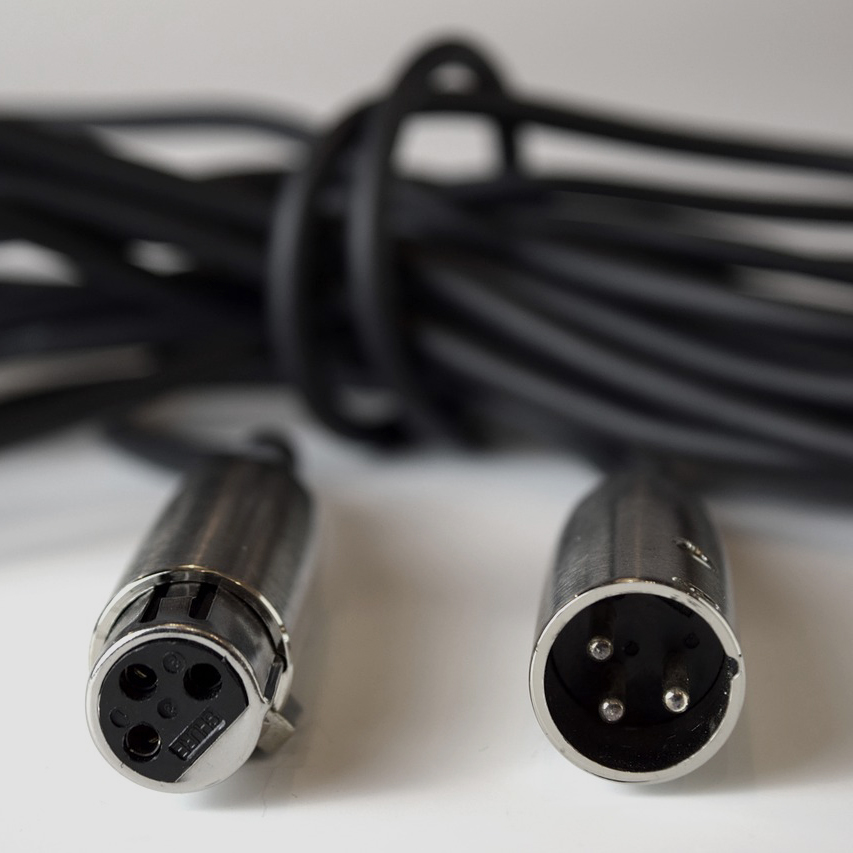
XLR Cables Definition and Purpose
XLR cables are balanced audio cables featuring three-pin connectors that provide separate paths for the positive and negative signals, along with a ground connection. They are widely used in professional audio applications due to their robustness and noise-canceling capabilities.
XLR Cables Common Uses and Applications
XLR cables are extensively used for microphones, connecting them to audio interfaces, mixers, and other audio devices. They are also utilized for balanced line-level connections, connecting powered speakers, and in live sound setups where long cable runs are required.
XLR Cables Advantages and Limitations
XLR cables excel in transmitting audio signals over long distances without significant signal degradation or noise interference. Their locking mechanism ensures a secure connection, making them ideal for stage performances and live sound applications. However, XLR cables are generally bulkier and costlier compared to TS and TRS cables.
RCA Cables
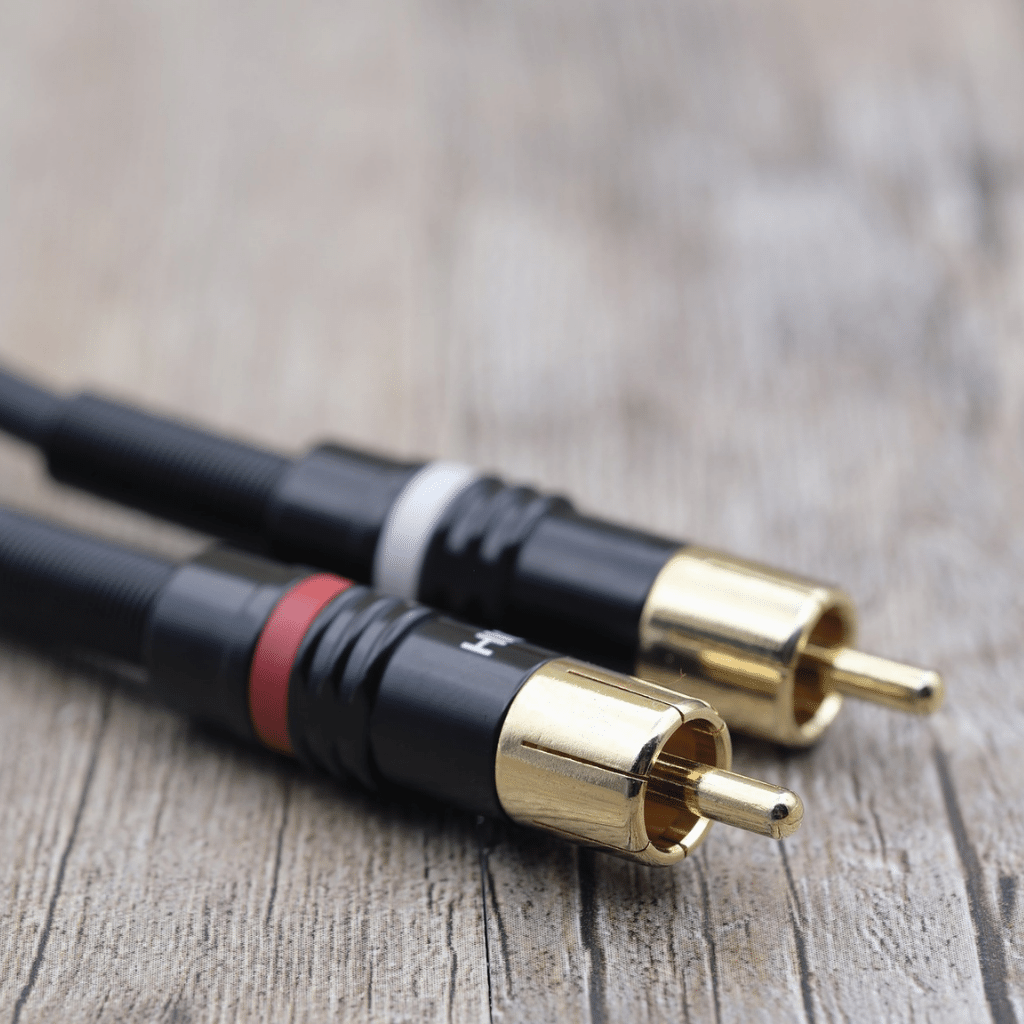
RCA Cables Definition and Purpose
RCA cables, also known as phono connectors, are a type of analog audio cable widely used for connecting audio devices such as amplifiers, receivers, and speakers. They feature distinctive connectors with a cylindrical metal body and a central pin surrounded by a metal ring.
RCA Cables Common Uses and Applications
RCA cables are commonly used in home theater systems, stereo setups, and audio recording studios. They are typically used for connecting audio sources, such as CD players or turntables, to amplifiers or receivers. RCA cables are also used for interconnecting various audio components within a system.
RCA Cables Advantages and Limitations
RCA cables offer several advantages, including their widespread availability, ease of use, and compatibility with a wide range of devices. They can transmit audio signals with good fidelity, making them suitable for most consumer applications.
However, RCA cables are not designed for long-distance audio transmission and may suffer from signal degradation over extended cable lengths. They are also susceptible to interference and noise pickup, which can affect audio quality. Additionally, RCA cables generally support unbalanced connections, which may be prone to interference in certain environments.
Speakon Cables

Speakon Cables Definition and Purpose
Speakon cables are a specialized type of audio cable primarily used in professional audio applications, such as live sound reinforcement systems and studio setups. They feature robust connectors with a locking mechanism, ensuring secure and reliable connections.
Speakon Cables Common Uses and Applications
Speakon cables are commonly used for connecting amplifiers to speakers or passive sound systems. They provide a secure and stable connection, minimizing the risk of accidental disconnections, especially in high-power applications. Speakon cables are often preferred in professional settings where durability and reliability are crucial.
Speakon Cables Advantages and Limitations
Speakon cables offer several advantages over other types of audio cables. The locking mechanism ensures a secure connection, preventing accidental disconnections during performances or transportation. They are capable of handling high power levels, making them suitable for demanding audio setups.
However, Speakon cables are not as widely available as RCA cables, and they are less commonly used in consumer applications. They also require compatible Speakon connectors, which may not be compatible with all audio equipment.
Digital Audio Cables
TOSLINK Cables

TOSLINK cables, also known as optical cables, are a type of digital audio cable that use optical fibers to transmit audio signals in the form of light pulses. These cables are commonly used to connect audio devices such as TVs, soundbars, and game consoles to audio receivers or speakers.
TOSLINK Cables Definition and Purpose
TOSLINK cables feature a unique connector design that utilizes a standardized square-shaped plug with a rounded top and a single protruding optical port. This port uses a fiber-optic cable to transmit digital audio signals in the form of light pulses. The cables are capable of carrying uncompressed audio data, including formats such as PCM, Dolby Digital, and DTS.
TOSLINK Cables Common Uses and Applications
TOSLINK cables are widely used in home theater setups and professional audio environments. They provide a reliable and interference-free transmission of audio signals, making them ideal for high-quality audio reproduction. These cables can be found connecting devices like DVD/Blu-ray players, game consoles, soundbars, and audio receivers.
TOSLINK Cables Advantages and Limitations
One of the key advantages of TOSLINK cables is their immunity to electrical interference, as the audio signals are transmitted optically. This results in a cleaner and more accurate audio reproduction, particularly for long cable runs. TOSLINK cables also support multi-channel audio formats, making them suitable for surround sound systems.
However, it's important to note that TOSLINK cables have a limited bandwidth and are primarily designed for transmitting digital audio signals. They do not support other data formats such as video or Ethernet. Additionally, the square-shaped connector can be fragile and requires careful handling to prevent damage.
HDMI Cables

HDMI (High-Definition Multimedia Interface) cables are another type of digital audio cable commonly used in audio and video applications. These cables are designed to transmit high-quality audio and video signals, making them popular in home theater systems, gaming consoles, and multimedia setups.
HDMI Cables Definition and Purpose
HDMI cables use a compact and versatile connector that combines both audio and video signals into a single cable. The connectors have a distinctive rectangular shape with multiple pins inside. HDMI cables support various audio formats, including uncompressed stereo, multi-channel surround sound, and advanced audio codecs like Dolby TrueHD and DTS-HD Master Audio.
HDMI Cables Common Uses and Applications
HDMI cables are widely used to connect devices such as Blu-ray players, game consoles, set-top boxes, and computers to TVs, projectors, and audio receivers. They provide a convenient solution for transmitting high-definition audio and video signals over a single cable, eliminating the need for multiple connections.
HDMI Cables Advantages and Limitations
One of the major advantages of HDMI cables is their ability to transmit both audio and video signals, simplifying the setup and reducing cable clutter. They support high-definition resolutions and can carry high-quality audio formats, ensuring an immersive audiovisual experience. HDMI cables also support additional features like CEC (Consumer Electronics Control) and Ethernet connectivity.
However, it's worth noting that HDMI cables have a limited maximum cable length, typically around 15 meters (50 feet) for standard cables. Longer distances may require the use of signal boosters or active cables. Additionally, HDMI cables have different versions (e.g., HDMI 1.4, HDMI 2.0) with varying capabilities, so it's important to ensure compatibility with the devices being connected.
USB Cables

USB cables are widely used for various audio applications and offer versatile connectivity options. They are commonly used for connecting audio devices such as microphones, speakers, headphones, and audio interfaces to computers, smartphones, and other devices. USB stands for Universal Serial Bus, and it provides a standardized connection interface for data transfer and power supply.
USB Cables Definition and Purpose
USB cables are designed to transmit data and provide power between devices. They utilize a specific connector known as a USB connector, which comes in various shapes and sizes, including Type-A, Type-B, Micro USB, Mini USB, and USB Type-C. These connectors have different pin configurations and are compatible with specific devices.
USB Cables Common Uses and Applications
USB cables have become ubiquitous in the audio industry due to their convenience and compatibility. They are commonly used for:
- Connecting audio interfaces to computers for recording and playback.
- Linking MIDI controllers, keyboards, and synthesizers to computers for music production.
- Charging and connecting headphones, speakers, and portable audio devices.
- Connecting USB microphones for high-quality audio recording.
- Powering and connecting digital audio devices, such as DACs (Digital-to-Analog Converters) and audio interfaces.
USB Cables Advantages and Limitations
USB cables offer several advantages for audio applications. They provide a digital connection that can carry both audio data and power, reducing the need for separate power cables. USB cables also support plug-and-play functionality, allowing devices to be automatically recognized and configured by the operating system.
However, USB cables have some limitations as well. The maximum cable length for USB 2.0 is approximately 5 meters (16.4 feet), beyond which signal degradation may occur. USB 3.0 and later versions have improved data transfer rates and can support longer cable lengths. Additionally, USB cables may have different data transfer speeds, with USB 2.0 being slower than USB 3.0 and USB 3.1.
It's important to note that USB audio interfaces and devices may require specific drivers to be installed on the connected computer for proper functionality. Compatibility and driver support should be considered when using USB cables for audio purposes.
MIDI Cables

MIDI (Musical Instrument Digital Interface) cables are widely used in the music industry for connecting electronic musical instruments, controllers, and computers. They facilitate communication between MIDI-enabled devices, allowing for the transmission of musical performance data and control signals.
MIDI Cables Definition and Purpose
MIDI cables are specifically designed for transmitting MIDI data, which includes information such as note on/off commands, pitch bend, modulation, and control change messages. They utilize a standard MIDI connector, which features a unique five-pin DIN configuration.
MIDI Cables Common Uses and Applications
MIDI cables find extensive use in music production, live performances, and studio settings. Some common applications of MIDI cables include:
- Connecting MIDI keyboards, synthesizers, and controllers to computers for recording and playback.
- Linking multiple MIDI devices to create complex MIDI setups.
- Controlling virtual instruments and software synthesizers using MIDI controllers.
- Sending synchronization signals between MIDI devices, such as clock and tempo information.
- Enabling communication between MIDI-enabled effects processors and digital audio workstations (DAWs).
MIDI cables provide a reliable and efficient means of transmitting MIDI data, allowing musicians and producers to integrate various MIDI devices into their setups.
MIDI Cables Advantages and Limitations
One of the key advantages of MIDI cables is their ability to transmit MIDI data with minimal latency. MIDI is a low-bandwidth protocol, and MIDI cables can handle the data transmission requirements without significant delays.
MIDI cables also offer a standard interface that ensures compatibility between MIDI devices from different manufacturers. This standardized communication protocol allows for seamless integration.
FireWire Cables

FireWire cables are a type of audio cable commonly used in professional audio and video applications. These cables are designed to transmit digital data and are known for their high-speed data transfer capabilities. FireWire cables are also referred to as IEEE 1394 cables or i.LINK cables.
FireWire Cables Definition and purpose
FireWire cables are used to connect audio devices, such as audio interfaces, mixers, and external sound cards, to a computer or other compatible devices. They utilize a serial bus interface and can transfer data at high speeds, making them ideal for real-time audio and video streaming.
FireWire Cables common uses and applications
FireWire cables are widely used in the professional audio and video industry. They are commonly used in recording studios, live sound setups, and video production environments. FireWire cables allow for the transfer of multiple audio channels simultaneously, which is crucial in applications that require low latency and high-quality audio.
FireWire Cables advantages and limitations
FireWire cables offer several advantages in audio applications. They provide high-speed data transfer, ensuring a stable and reliable connection for real-time audio processing. FireWire cables also support daisy-chaining, allowing multiple devices to be connected in a chain without the need for additional hubs or switches.
However, it's important to note that FireWire technology has been largely replaced by other interfaces, such as USB and Thunderbolt, in recent years. These newer interfaces offer higher data transfer rates and broader compatibility with modern devices. As a result, the use of FireWire cables has declined, and many newer audio devices no longer feature FireWire ports.
S/PDIF Cables

S/PDIF Cables Definition and Purpose
S/PDIF (Sony/Philips Digital Interface) cables are widely used for transmitting digital audio signals between various audio devices. They are primarily used in consumer electronics, such as DVD players, home theater systems, and soundbars. S/PDIF cables can carry both compressed and uncompressed audio data, making them versatile for different applications.
S/PDIF Cables Common Uses and Applications
S/PDIF cables are commonly used to connect audio sources, such as CD players or digital audio interfaces, to receivers or amplifiers. They allow for the transfer of digital audio signals without any loss in quality. Additionally, S/PDIF cables can be used to connect a computer to an external audio device, enabling high-quality audio playback.
S/PDIF Cables Advantages and Limitations
One of the key advantages of S/PDIF cables is their ability to transmit audio in a digital format, which helps to maintain the integrity of the original audio signal. They are also capable of transmitting multiple channels of audio, supporting surround sound formats like Dolby Digital and DTS. Moreover, S/PDIF cables are relatively affordable and widely available.
However, it's important to note that S/PDIF cables have some limitations. They have a limited transmission distance, typically up to 5 meters, before signal degradation occurs. Additionally, S/PDIF cables are susceptible to electromagnetic interference, which can introduce noise into the audio signal. It's crucial to use high-quality cables and ensure proper shielding to minimize these issues.
AES3 Cables

AES3 Cables Definition and Purpose
AES3 (Audio Engineering Society 3) cables, also known as AES/EBU cables, are professional-grade digital audio cables designed for professional audio applications. They are commonly used in recording studios, live sound setups, and broadcasting environments. AES3 cables provide a reliable and high-quality means of transmitting digital audio signals in a balanced format.
AES3 Cables Common Uses and Applications
AES3 cables are widely used in professional audio setups to connect audio interfaces, mixing consoles, and digital processors. They ensure accurate and pristine audio transmission, making them ideal for critical audio applications where fidelity and reliability are paramount. AES3 cables can handle high sample rates and bit depths, making them suitable for high-resolution audio.
AES3 Cables Advantages and Limitations
AES3 cables offer several advantages over other digital audio cables. They employ a balanced transmission method, which helps in reducing noise and interference. This balanced configuration, often referred to as the XLR arrangement (Tip/Ring/Sleeve), ensures a robust and interference-free signal transfer. AES3 cables also support longer transmission distances, typically up to 100 meters, without signal degradation.
However, AES3 cables can be relatively expensive compared to other digital audio cables. They are primarily designed for professional audio applications, and their high-quality construction contributes to the higher cost. Additionally, AES3 cables may require specialized connectors, such as XLR or BNC, which can limit their compatibility with consumer audio devices.
Specialized Audio Cables
When it comes to audio cables, there are a variety of specialized options available to cater to specific needs and applications. Two such specialized audio cables are BNC cables and banana cables. Let's explore their definitions, purposes, common uses, applications, as well as their advantages and limitations.
BNC Cables

BNC Cables Definition and Purpose
BNC cables, short for Bayonet Neill-Concelman cables, are coaxial cables commonly used for transmitting video and audio signals. The BNC connector features a bayonet-style coupling mechanism that provides a secure and quick connection. These cables are designed to carry high-frequency signals with low signal loss, making them suitable for professional audio and video applications.
BNC Cables Common Uses and Applications
BNC cables are widely used in various industries, including broadcasting, telecommunications, and instrumentation. They are commonly used for connecting video surveillance systems, professional audio equipment, and high-resolution video displays. BNC cables are also found in oscilloscopes, spectrum analyzers, and other testing and measurement devices.
BNC Cables Advantages and Limitations
BNC cables offer several advantages that make them popular in specific applications. Firstly, their bayonet-style connectors ensure a secure and reliable connection, minimizing the risk of accidental disconnection. Secondly, BNC cables provide excellent shielding against electromagnetic interference (EMI) and radio frequency interference (RFI), resulting in high-quality audio signals. Additionally, BNC cables are relatively easy to install and are available in various lengths to suit different setups.
However, it's important to note that BNC cables are not as commonly used for consumer audio setups or personal devices. They are more prevalent in professional settings where the specific characteristics of BNC connectors are required. Furthermore, BNC cables may have limited compatibility with consumer audio equipment, as they are primarily designed for video and high-frequency applications.
Banana Cables

Banana Cables Definition and Purpose
Banana cables, also known as banana plug cables, utilize banana connectors at both ends. These connectors consist of a cylindrical metal pin (male connector) and a corresponding socket (female connector). Banana cables are primarily used for audio applications, offering a reliable connection and easy plug-and-play functionality.
Banana Cables Common Uses and Applications
Banana cables are commonly used in home audio setups, speaker connections, and other audio systems. They provide a convenient and secure way to connect speakers, amplifiers, receivers, and other audio equipment. Banana cables are often preferred by audio enthusiasts and professionals due to their simplicity and ease of use.
Banana Cables Advantages and Limitations
Banana cables offer several advantages that make them popular among audio enthusiasts. Firstly, their banana connectors provide a firm and secure connection, ensuring minimal signal loss and maintaining audio quality. Secondly, banana cables are easy to install and remove, making them convenient for quick setup changes. They also eliminate the need for stripping and soldering wires, simplifying the connection process.
However, it's important to note that banana cables may not be suitable for every audio setup. Some high-end audio systems or professional applications may require different types of connectors for compatibility or specific signal requirements. Additionally, banana cables are typically used for low- to moderate-power applications and may not be suitable for high-power audio systems.
Choosing the Right Audio Cable or Connector
When it comes to selecting the right audio cable or connector for your audio setup, there are several factors to consider. Understanding these considerations will help you make an informed decision that suits your specific needs. Here are some key points to keep in mind:
Considerations for selecting the appropriate cable
- Audio quality requirements: The first consideration is the audio quality you desire. Different cables and connectors have varying levels of signal fidelity and noise resistance. For professional audio applications or high-fidelity audio systems, you may want to invest in cables with better shielding and higher-quality materials.
- Equipment compatibility: It's crucial to ensure that the cable or connector you choose is compatible with your audio equipment. Check the specifications of your devices to determine the type of connectors they support. Common audio connectors include 3.5mm connectors, 1/4-inch connectors, RCA connectors, and XLR connectors.
- Cable length and signal loss: The length of the cable can affect the signal quality and introduce signal loss. Longer cables tend to have higher resistance, which can result in attenuation and degrade the audio signal. If you need to transmit audio over long distances, consider using cables with larger conductor sizes or signal boosters to minimize signal loss.
- Budget considerations: Your budget is another important factor to consider. Different cables and connectors vary in price depending on their quality and features. While it's essential to invest in quality cables, you should also find a balance between your audio needs and budget constraints.
Tips for proper cable management and organization
Effective cable management and organization play a crucial role in maintaining a clean and organized audio setup. Here are some tips to help you achieve this:
- Labeling and color-coding: Use labels or color-coded tags to identify different cables and connectors. This practice makes it easier to identify and trace cables when troubleshooting or making changes to your setup.
- Velcro cable ties or cable sleeves: Use velcro cable ties or cable sleeves to bundle and secure cables together. This method prevents tangling and keeps cables neat and organized.
- Cable routing and separation: Route cables along separate paths to avoid interference or crosstalk. Keep power cables separate from audio cables to minimize the chances of electrical interference.
- Proper storage: When not in use, store cables in a dedicated cable bag or case to protect them from damage and tangling. This practice ensures that cables remain in good condition and are readily available when needed.
Remember, proper cable management not only enhances the aesthetic appeal of your audio setup but also improves signal integrity and makes maintenance easier.
Final Thoughts
In conclusion, understanding the various types of audio cables and connectors is essential for anyone working with audio equipment. The world of audio connectors is vast and diverse, with each type serving a specific purpose and offering unique features. Whether you're a musician, sound engineer, or audio enthusiast, having a solid grasp of audio connectors will help you make informed decisions about your audio setup.
It's important to note that audio cables and connectors come in various lengths and configurations to accommodate different setups and requirements. Whether you need a short cable for connecting two devices in close proximity or a longer cable to reach across a room or stage, there are options available to suit your needs.
When it comes to selecting audio cables and connectors, factors such as signal quality, durability, and compatibility should be considered. It's advisable to invest in high-quality cables made from reliable materials to ensure optimal audio transmission and longevity.
In summary, audio connectors and cables play a crucial role in the world of audio. They allow us to connect and transfer audio signals between devices, enabling us to enjoy music, movies, and other audio content. By familiarizing yourself with the different types of audio connectors and understanding their applications, you can enhance your audio experience and make informed decisions when it comes to setting up your audio system.
Last update on 2026-10-12 / Affiliate links / Images from Amazon Product Advertising API


