

Trying to build out a home studio without blowing the whole budget on a keyboard controller? You're in the right place. We've rounded up the best MIDI keyboards under $100 so you can start writing, sequencing, and playing virtual instruments without waiting until you can afford the fancy semi-weighted, 61-key flagship model.
Budget MIDI keyboards are not "bad" keyboards. You'll make a few compromises — maybe fewer pads, mini-sized keys, or a lighter plastic shell — but none of that stops you from writing a great song. Countless hit records get sketched out every year on a cheap, sometimes downright disposable, MIDI controller. And here's the thing worth repeating: it's a thousand times better to own a cheap MIDI keyboard than to own none at all. The leap from drawing MIDI blocks in with a mouse to actually playing them in on a keyboard is far bigger than the leap from a budget controller to an expensive one.
Quick Summary: Best Budget MIDI Keyboards at a Glance
Short on time? Here's the whole list in one table. Scroll down for the full reviews, or use the tool below to get a personal recommendation in one tap.
| Model | Keys | Pads | Best Suited For | Approx. Street Price |
|---|---|---|---|---|
| Akai Professional MPK Mini IV | 25 mini | 8 (RGB, pressure-sensitive) | Beatmaking, MPC Beats workflow | ~$99 |
| Novation Launchkey Mini MK4 | 25 mini | 16 (RGB, polyphonic aftertouch) | Ableton Live & Logic Live Loops | ~$99 |
| Arturia MiniLab 3 | 25 mini | 8 (2 banks, RGB) | Build quality, software bundle | ~$99 |
| Novation FLkey Mini | 25 mini | 16 (RGB) | FL Studio producers | ~$99 |
| Nektar SE25 | 25 mini | None | Ultra-portable travel rig | ~$59 |
| M-Audio Keystation Mini 32 MK3 | 32 mini | None | Extra range for melodies & chords | ~$59 |
Prices move around with sales and retailer stock, so tap "Check Price" on any pick below for the current number.
🎹 Find Your Perfect Budget MIDI Keyboard
Tap whatever matters most to you and we'll point you straight to the right pick.
In-Depth Reviews: The Top MIDI Controllers Under $100
Every model below is currently sold new for under $100 in the US and represents the latest generation from its manufacturer — we've skipped anything running on an outdated MK2/MK3 platform that's been superseded.
Best for Beatmaking
1. Akai Professional MPK Mini IV
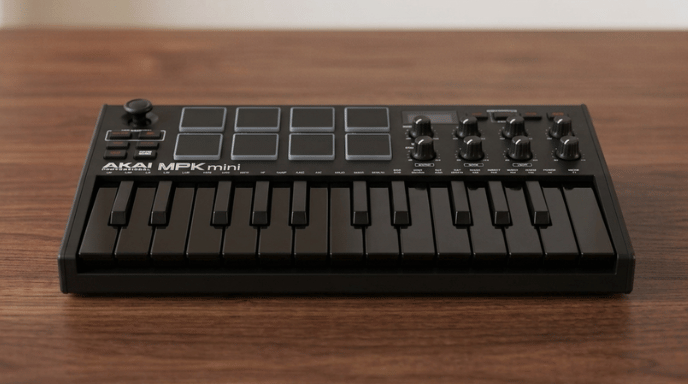
The MPK Mini has been the go-to compact controller for beatmakers for over a decade, and the fourth generation is the biggest overhaul the line has seen. The old thumb joystick is gone, replaced with dedicated pitch and mod wheels, and the whole unit now has a full-color display for real-time feedback. You still get 25 velocity-sensitive mini keys and 8 genuine MPC-style backlit pads with pressure sensitivity, but the arpeggiator has been expanded with pattern, freeze, and mutate functions, plus scale and chord modes for staying in key. It ships with a Studio Instrument Collection of 1,000+ presets from AIR, Akai, and Moog, on top of pre-mapped Ableton Live Lite, Logic Pro, and FL Studio integration.
Number of Keys: 25
Other Features:
- 8 backlit MPC-style pads with pressure sensitivity (aftertouch)
- Dedicated pitch and mod wheels (replaces the old joystick)
- 8 assignable 360° knobs and a full-color display
- USB-C connection plus a full-size 5-pin MIDI output for hardware synths
- Includes MPC Beats, three AIR Music Tech instruments, and an NI Komplete Select bundle
✅ Pros
- Legendary MPC-style pad feel
- Real pitch/mod wheels instead of a fiddly joystick
- Huge included software bundle
❌ Cons
- Mini keys feel cramped for two-handed playing
- No aftertouch on the keys themselves
Best for Ableton Live
2. Novation Launchkey Mini MK4
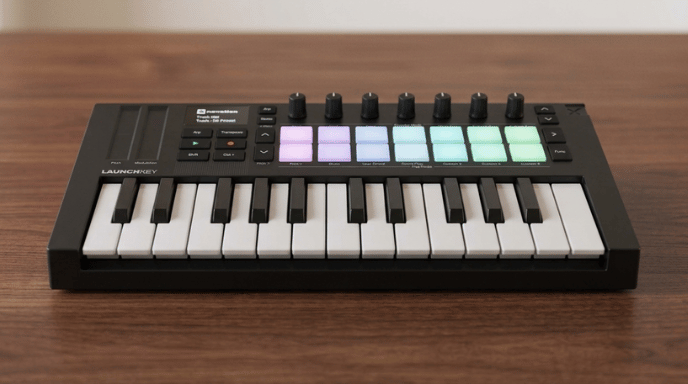
If you live inside Ableton Live's Session View, the Launchkey Mini MK4 is built specifically for you. The 16 RGB pads now support polyphonic aftertouch, the OLED display shows exactly which chord you're playing in real time, and the whole layout maps directly to launching clips, arming tracks, and controlling your mixer without touching a mouse. You also get three Chord Modes, a Scale Mode locked to 30 different scales, and a genuinely useful arpeggiator. Novation bundles Ableton Live 12 Lite along with instruments from GForce, Orchestral Tools, and Klevgrand.
Number of Keys: 25
Other Features:
- 16 RGB pads with polyphonic aftertouch and radial FSR sensors
- 8 assignable encoders and a crisp OLED display with chord detection
- Deep, native integration with Ableton Live and Logic's Live Loops
- Sustain pedal input and 3.5mm MIDI output (adapter sold separately)
✅ Pros
- Unmatched Ableton Live session control
- 16 aftertouch-capable pads is the most on any keyboard here
❌ Cons
- No full-size 5-pin MIDI out in the box
- Slight learning curve outside of Ableton
Best Build Quality & Software Bundle
3. Arturia MiniLab 3
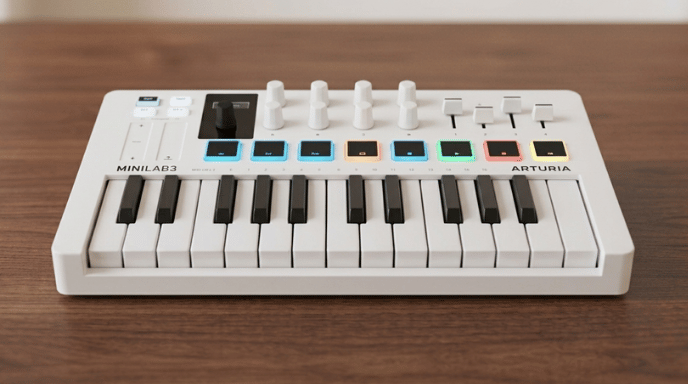
The MiniLab 3 is the one to buy if you care about how a controller is actually put together. It's built with at least 50% recycled materials and backed by a 5-year warranty — well beyond what any competitor offers at this price. On top of the 25 velocity-sensitive keys, you get two banks of 8 RGB pads, 8 rotary encoders, and 4 physical faders, which is more hands-on mixing control than anything else on this list. The real headline, though, is the software: Analog Lab Intro, Ableton Live Lite, UVI's Model D grand piano emulation, and NI's The Gentleman piano add up to well over $100 of software value bundled with a sub-$100 controller.
Number of Keys: 25
Other Features:
- 2 banks of 8 RGB-backlit pads plus 8 rotary encoders and 4 sliders
- Mini display with a clickable browsing knob
- Built-in arpeggiator, Hold mode, and Chord mode
- USB-C and full-size MIDI output, 5-year manufacturer warranty
- Includes Analog Lab Intro, Ableton Live Lite, UVI Model D, and NI The Gentleman
✅ Pros
- Rigid, durable chassis with real physical faders
- Software bundle alone is worth more than the hardware price
❌ Cons
- Slightly heavier than the Akai or Novation minis
- Only 8 pads per bank vs. 16 on the Launchkey or FLkey
Best for FL Studio
4. Novation FLkey Mini
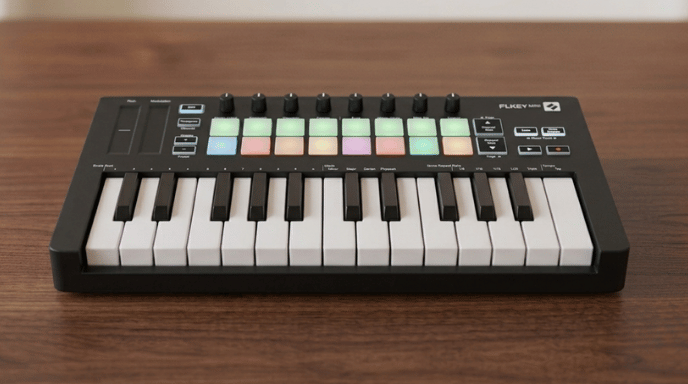
FLkey Mini is the only controller on this list built and officially endorsed specifically for FL Studio, and it shows the moment you plug it in. Sequencer Mode maps the 16 RGB pads directly to FL's step sequencer, and the same pads switch instantly into Channel Rack playability or SliceX slice-triggering. The 8 knobs jump straight onto FL's mixer volume and pan, Scale Mode keeps every note you play in key, and Fixed Chord mode lets you trigger a full chord from a single pad. It's a genuinely zero-mapping setup with FL Studio, though that tight integration is also its main limitation if you switch DAWs later.
Number of Keys: 25
Other Features:
- 16 RGB velocity-sensitive pads mapped to FL Studio's Channel Rack, FPC, and SliceX
- 8 knobs, pitch/mod touch strips, and dedicated transport buttons
- Scale mode, Fixed Chord mode, and Note Repeat for fast hi-hat rolls
- Includes a 6-month trial of FL Studio Producer Edition plus NKS-ready integration
✅ Pros
- Flawless, zero-mapping FL Studio workflow
- 16 pads plus proper Step Sequencer control
❌ Cons
- Much less useful if you switch to Logic or Pro Tools
- TRS MIDI out needs an adapter for 5-pin hardware
Best Ultra-Portable Pick
5. Nektar SE25
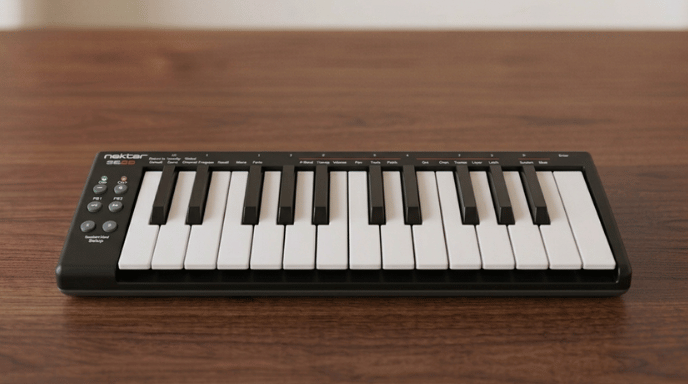
If pads and knobs just aren't your thing and you want the smallest, lightest possible way to sketch melodic ideas, the SE25 is hard to beat. It's roughly as wide as a laptop, weighs next to nothing, and slides straight into a laptop sleeve. What makes it more than a "dumb" keyboard is the dedicated Part 2 button, which instantly shifts the octave, layers a harmony on top of what you're playing, or switches MIDI channel entirely — a genuinely clever trick for such a stripped-back controller. Register the keyboard and you unlock Nektar DAW Integration for transport and track-selection control in most major DAWs, and it even ships with the Bitwig 8-Track DAW included.
Number of Keys: 25
Other Features:
- Zero pads, zero knobs — just keys and six control buttons
- Unique "Part 2" button for instant octave shifting, layering, or MIDI channel swaps
- Three selectable velocity curves to match your playing style
- Nektar DAW Integration for Bitwig, Cubase, GarageBand, Logic, Reaper, Studio One, and more
- Includes the Bitwig 8-Track DAW
✅ Pros
- Unbeatable size, weight, and price
- Surprisingly playable keys for something this small
❌ Cons
- No pads, knobs, or faders whatsoever
- Modulation is essentially on/off, not gradual
Best for Extra Melodic Range
6. M-Audio Keystation Mini 32 MK3
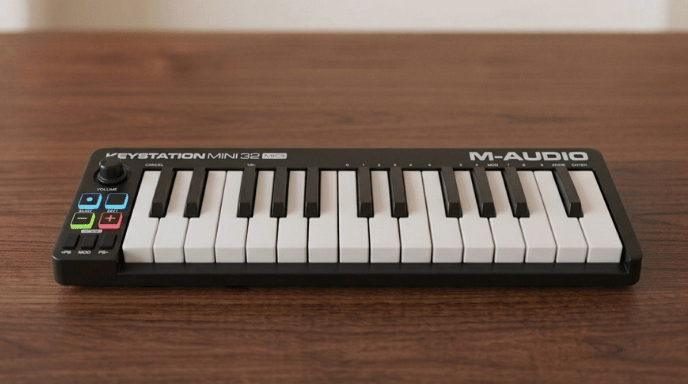
Every other keyboard on this list caps out at 25 keys — two octaves. The Keystation Mini 32 MK3 gives you an extra half-octave, which is enough room to sketch a two-handed chord voicing without constantly hitting the octave-shift button. It skips pads entirely in favor of a single assignable knob, a sustain button, and pitch/mod controls, and it bundles Pro Tools First along with Xpand!2, a genuinely solid all-in-one instrument plugin from AIR Music Tech.
Number of Keys: 32
Other Features:
- 32 velocity-sensitive keys for an extra half-octave of range
- 3 assignable buttons and 1 rotary knob
- Modulation and pitch bend controls, plus a dedicated sustain button
- Selectable velocity curves to adjust touch dynamics
- Includes Pro Tools First and Xpand!2 by AIR Music Tech
✅ Pros
- 32 keys gives a genuine half-octave more range than every other pick here
- Solid, no-nonsense build from a trusted brand
- Pro Tools First bundle is a great on-ramp if you don't have a DAW yet
❌ Cons
- No pads at all — not a fit for finger drumming or beatmaking
- Just one knob, so hands-on mixing control is minimal
If any of these feel too limited for where your production is headed, take a look at our full guide to the Best MIDI Keyboards for Music Production, which covers larger, semi-weighted, and more feature-rich options above the $100 mark.
Intent-Based Buying Guide: How to Choose a Budget MIDI Controller
All six of these keyboards look similar on paper — 25 mini keys, USB power, a software bundle. Here's how to actually tell them apart based on how you work.
1. DAW Integration vs. Manual MIDI Mapping
Some controllers, like the FLkey Mini and Launchkey Mini, are pre-mapped to a specific DAW the moment you plug them in — knobs already control volume, pads already trigger the right functions. Others are generic controllers that require you to manually assign each knob and pad to a MIDI CC number inside your software. A matched controller-and-DAW pairing can save you hours of setup, so it's worth checking your DAW against each model's official integration list before you buy. If you're new to the whole process, our guide to connecting a MIDI keyboard to your computer walks through the cabling and setup from scratch.
2. Understanding Key Action in the Sub-$100 Bracket
Set your expectations here first: true weighted hammer-action keys, the kind that mimic an acoustic piano, simply don't exist under $100. What you're choosing between is synth-action keys (light, springy, and fast — great for basslines, arpeggios, and leads) and semi-weighted keys (a little more resistance, sitting between synth action and a real piano feel). Every keyboard on this list uses synth or lightly semi-weighted mini keys, which are genuinely great for electronic production but not what a classically trained pianist would want long-term. If any of the terminology here is unfamiliar, our glossary of audio and MIDI terms covers velocity, aftertouch, and the rest in plain English.
3. Performance Control Hardware: Pads, Knobs, and Faders
Break your decision down by what you'll actually be doing with your hands:
- Need pads? Go with the Akai MPK Mini IV or Novation Launchkey/FLkey Mini — all built for beatmakers and finger drummers.
- Need faders or sliders? The Arturia MiniLab 3 is the only one here with physical faders, which media composers and mix-focused producers will appreciate for automating dynamics.
- Just need keys? The M-Audio Keystation Mini 32 or Nektar SE25 strip out the extras so you can focus purely on melodies and chords.
If you're still deciding what your workflow even looks like, our roundup of free beat-making software and DAWs is a good place to figure that out before you commit to hardware.
4. Calculating the Hidden Value of Software Bundles
Budget hardware is often a Trojan horse for premium software. Akai bundles MPC Beats and Native Instruments sounds, Arturia bundles Analog Lab and a genuinely excellent piano emulation, and Novation bundles Ableton Live Lite or an FL Studio Producer trial depending on the model. Before you compare prices, add up what the included software would cost on its own — it often tips the value equation entirely in favor of one controller over another. Pair whichever you choose with a solid interface and monitors from our home recording studio equipment list and you've got a genuinely capable starter setup.
Frequently Asked Questions
Can you actually make hit songs on a cheap MIDI keyboard?
Yes. A MIDI controller only sends digital performance data — notes and velocity — not audio. The actual sound engine lives inside your computer's software instruments. If your plugins are high quality, a $59 keyboard will sound exactly the same as a $500 one, because the keyboard never touches the audio signal at all.
Do budget MIDI keyboards need external power or an audio interface?
No. Almost every sub-$100 MIDI controller, including everything on this list, is entirely USB bus-powered and class-compliant. Plug it into your laptop or PC and it works — no audio interface or wall outlet required. If you do eventually want to route it through outboard gear, our MIDI connection guide covers USB vs. traditional 5-pin setups.
Is a 25-key controller enough for a beginner?
Yes, for electronic music, pop, hip-hop, and general beat production, 25 keys is plenty. If your main goal is learning traditional two-handed classical piano, though, save up for a 49- or 61-key controller with more range instead.
What's the difference between these and a full-size digital piano?
A MIDI keyboard has no built-in sounds of its own (with rare exceptions) — it's purely a controller that plays whatever software instrument you load in your DAW. A digital piano generates its own sound and can be played standalone. If you're just getting started with a DAW like GarageBand, check our GarageBand walkthrough to see exactly how a MIDI keyboard slots into that workflow.
Where's the best place to buy these MIDI keyboards?
For the best warranty coverage and customer service, prioritize dedicated musical retailers or authorized storefronts on Amazon. Every "Check Price" button in this guide links straight to the current listing so you can compare in real time.
Whichever model you land on, don't let a small budget stop you from picking one up. Every keyboard in this guide to the best MIDI keyboards under $100 will get virtual instruments under your fingers and speed up your workflow immediately — and once you've outgrown it, our guide to more advanced MIDI keyboards is ready for when you're due an upgrade.
Last update on 2026-08-20 / Affiliate links / Images from Amazon Product Advertising API

